
If you’re shopping for a backup camera, these five models stand out for reliability, ease of installation, and useful features. This guide helps buyers choose based on vehicle type, installation style, and environment. The top picks cover plug‑and‑play kits, wireless options, and dashboard-friendly displays. Best for drivers who want quick setup, best for tech lovers who want real‑time navigation integration, best for rugged use, and best for wireless installation without heavy wiring.
Choosing the right backup camera involves considering installation effort, image quality, weather resistance, and compatibility with your vehicle. The table below summarizes five strong options and who they suit best.
| Product | Best For | Key Benefit |
|---|---|---|
| HD 1080P Backup Camera Plug & Play (LeeKooLuu) | Easy DIY Installers | 15-minute plug‑and‑play setup with stable, real‑time 1080P video |
| PixelMan PMD2A-S 1080P | Clear Night Vision Fans | AHD/HD switchable for sharp color in all light |
| NATIKA Backup/Front View | OEM-Style Look | IP69K weatherproof, dual-view capability |
| AUTO-VOX Solar Wireless Backup Camera | Wiring-Free Installers | 2-minute DIY with solar power and wireless reliability |
| WOLFBOX G840S 12″ Mirror Dash Cam | All-in-One Display | Large 12″ 4K/1080p dual cameras, WiFi GPS |
HD 1080P Backup Camera Plug & Play: 15 Minutes Quick Install

This LeeKooLuu kit targets buyers who want a straightforward, low-effort installation. It connects via a simple two-step process and supports repeated use with minimal signal loss. The system promises real-time 1080P color images with a stable signal, making it ideal for everyday drivers and first-time install enthusiasts.
Best for: drivers who value quick setup and reliable color video during backing in diverse weather conditions. Why selected: the kit’s plug‑and‑play approach reduces wiring complexity while delivering HD imagery. Caution: monitor availability or power source compatibility may vary by vehicle; ensure the cigarette lighter or USB power option fits your car.
9″ Wireless Apple Carplay Screen With 1080p Backup Camera

This HAUXIY product blends CarPlay/Android Auto with a 1080P backup camera and a 9-inch display. It’s best for tech enthusiasts who want navigation, voice control, and dash integration in one package. The system facilitates real-time GPS navigation and voice commands while offering a dedicated reversing view when needed.
Best for: users who want integrated smartphone functionality alongside a backup camera. Why selected: it combines CarPlay/Android Auto with a built‑in camera, enabling seamless app access. Caution: ensure your phone’s compatibility and that the device supports the specific navigation apps you rely on.
PixelMan PMD2A-S AHD 1080P Backup Camera
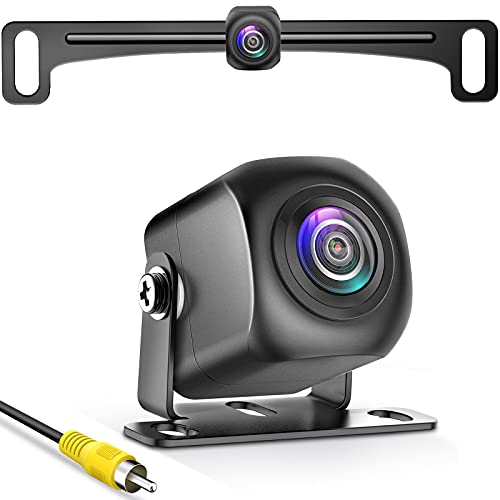
The PixelMan PMD2A-S is designed for drivers who want high-clarity images with robust night vision. It supports HD and AHD switching for flexible output depending on camera system compatibility. The device uses a larger chip and improved brightness to reduce distortion and improve color accuracy, especially at night.
Best for: drivers needing strong nighttime visibility and versatile signal options. Why selected: the dual‑output option (HD/AHD) enhances compatibility with a wider range of displays. Caution: some screens must support AHD input to achieve 1080P; verify your monitor capabilities before purchase.
NATIKA Backup/Front View Camera IP69K
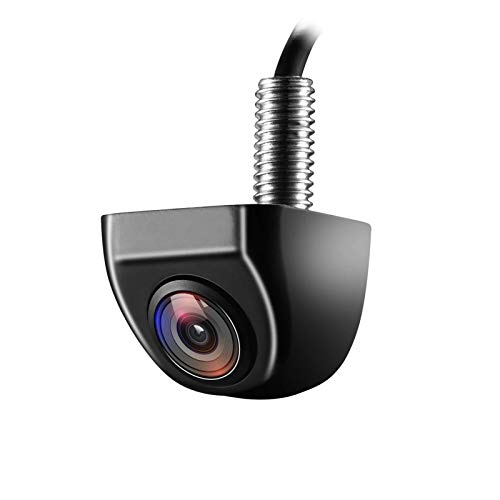
The NATIKA model offers dual-view versatility and a rugged, waterproof build with IP69K sealing. It’s suitable for vehicles that require a sturdy OEM‑style camera with the option to switch between rear and front views and enable or disable guide lines. The installation may require a compatible harness for factory radios.
Best for: owners who want a durable, OEM-like appearance and broad viewing options. Why selected: the dual-view capability plus the metal housing boosts durability and versatility. Caution: may require a separate harness for certain factory radios.
WOLFBOX G840S 12″ 4K Mirror Dash Cam Backup Camera

The WOLFBOX G840S provides a large 12″ display, front 4K and rear 1080p recording, and built‑in GPS with WiFi connectivity. It’s a strong choice for drivers who want an all-in-one system that assists with both driving and parking. The larger screen helps reduce blind spots and makes playback easy on the go.
Best for: drivers seeking a comprehensive dash-cam + backup camera with robust tracking and large viewing area. Why selected: the combination of 4K front recording, 1080p rear, and integrated GPS offers a complete safety and evidence solution. Caution: the feature set relies on the included app and GPS data; ensure compatibility with your phone and mapping needs.
Buying Guide: Key Purchase Considerations
What installation style fits my vehicle?
Plug‑and‑play kits are ideal for quick installs and minimal wiring. Wireless options reduce drilling and wiring but can be sensitive to interference. Check your vehicle’s power options and whether a separate display is preferred or required.
What image quality do I need?
1080P provides crisp daytime images; AHD can offer smoother performance on some monitors. Night vision quality matters in low light environments; look for cameras with good low-light performance and appropriate sensors.
Weather resistance and durability
IP69K or similar ratings indicate strong waterproofing and weather resistance. Metal housings tend to be more durable in rough conditions. Consider your climate and exposure (dust, rain, snow, extreme temps).
Display size and interface
A larger display helps with parking accuracy, but it may require a larger dash space. Ensure the monitor’s input options (HDMI, AV, USB) match your vehicle’s head unit or display system.
Compatibility and future-proofing
HD vs. HD‑AHD switching and compatibility with factory radios are important. If you plan to upgrade your head unit, verify that the camera’s output matches your monitor’s input and that any required harnesses are available.
Price and installation support
Consider total cost including any harnesses or mounting brackets. Some kits include all needed accessories; others require additional parts. A straightforward installation often reduces long-term maintenance concerns.
Frequently Asked Questions
- Do these cameras require professional installation? Most can be installed by a confident DIYer with basic tools, especially plug‑and‑play and wireless kits. Some setups may need additional harnesses for factory radios.
- Is wireless always better than wired? Wireless reduces wiring but can be susceptible to interference. Wired solutions typically offer more consistent signal and reliability in challenging environments.
- Can I use any monitor with a backup camera? Not all monitors support all camera outputs (HD, AHD, HDMI, or RCA). Verify monitor input compatibility with your camera’s output.
- What features matter most for night driving? Look for cameras with low-light performance, infrared or high-intensity LED support, and a high-quality image sensor to improve visibility in darkness.
- Do backup cameras improve safety? Yes, they provide a clearer view of the area behind the vehicle, reducing blind spots and helping with parking and reversing in tight spaces.
- Is IP69K waterproof enough for harsh weather? IP69K is among the highest ratings for weather resistance, suitable for rain, dust, and high-pressure water exposure.
