
Answering the common buyer question, these are the best auto GPS devices and head units for reliable in-car navigation and smarter driving. The top picks cover dedicated GPS navigators, Android Auto/CarPlay upgrades, and large-display dash units. They’re ideal for daily commuters, road-trippers, and tech-minded drivers who want intuitive maps, live traffic, and hands-free features. The quick comparison below highlights who each product is best for, helping you pick the right fit at a glance.
Summary of chosen products
| Product | Best For | Key Benefit | Display |
|---|---|---|---|
| Garmin DriveSmart 76 | Mid-size car owners | Bright maps with Garmin Voice Assist | 7-inch |
| Garmin DriveSmart 86 | Large display lovers | 8-inch high-resolution maps, voice assist | 8-inch |
| Garmin Drive 53 | Compact, simple navigation | Easy-to-see maps, driver alerts | 5-inch |
| MININAVI Car Radio Upgrade for Toyota RAV4 | RAV4 owners seeking Android Auto/CarPlay | 9-inch IPS touchscreen with wireless CarPlay/Android Auto | 9-inch |
| AINAVI 11.5 inch Touchscreen Car Stereo | Large-screen dash upgrade | 11.5-inch QLED-like display with Android | 11.5-inch |
Garmin DriveSmart 76, 7-inch Car GPS Navigator

The Garmin DriveSmart 76 provides a 7-inch high-resolution display with map updates for North America. It emphasizes easy readability, Garmin Voice Assist, and hands-free calling when paired with a smartphone. This model suits drivers who want clear navigation prompts, live traffic updates, and simple on-screen interaction for daily commuting and road trips.
Best for: Drivers who prefer a mid-size, feature-rich navigator with strong voice and safety alerts. Why selected: Combines reliable maps with traveler-focused extras like the national parks directory and smart notifications.
Limitations: Might be less immersive than larger displays for in-dash entertainment; ensure your vehicle has Bluetooth for hands-free calling.
Garmin DriveSmart 86, 8-inch Car GPS Navigator

The DriveSmart 86 offers an expansive 8-inch display with high-resolution maps and Garmin Voice Assist. It delivers live traffic and weather, traffic cams, smart notifications, and a national parks directory. It’s well-suited for drivers who want a larger visual footprint and robust trip planning tools for longer drives and road trips.
Best for: Those who want a bigger, easier-to-see screen with comprehensive travel resources. Why selected: Combines a large display with advanced navigation features and a rich point-of-interest ecosystem.
Limitations: Larger form factor may require more dash space; check mounting fit and power requirements.
Garmin Drive™ 53 GPS Navigator

The Drive 53 uses a bright 5-inch touchscreen with simple menus and easy-to-see maps. It adds driver alerts for school zones, speed changes, and sharp curves, plus options to view food, fuel, and rest areas along routes. This model is best for shorter daily trips where compact form and straightforward navigation are priorities.
Best for: Small-car owners or first-time GPS users who want a simple, reliable navigator. Why selected: Clear display with essential safety alerts and situational awareness features.
Limitations: Smaller screen may be less convenient for complex routes or passengers who prefer larger visuals.
MININAVI Car Radio Upgrade for Toyota RAV4

This 9-inch Android-based head unit upgrade for Toyota RAV4 integrates wireless CarPlay and Android Auto, GPS navigation, and a high-definition IPS touchscreen. It’s best for RAV4 owners who want a modern infotainment upgrade with app support and built-in navigation while preserving vehicle controls.
Best for: Toyota RAV4 drivers seeking a comprehensive Android Auto/CarPlay upgrade. Why selected: Combines large display with flexible connectivity and GPS navigation.
Limitations: Compatibility relies on the specific RAV4 model year; verify CAN bus firmware compatibility prior to purchase.
AINAVI 11.5 Inch Touchscreen Car Stereo with GPS
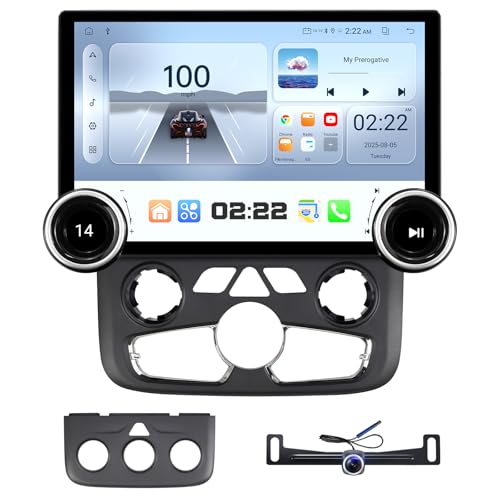
The AINAVI 11.5-inch touchscreen is a dash-mounted upgrade featuring Android-based navigation, built-in GPS, and wireless connectivity. It supports CarPlay/Android Auto and provides a large display ideal for in-vehicle entertainment alongside navigation. This unit is best for drivers who want an expansive touchscreen cockpit replacement with GPS capabilities.
Best for: Dash-upgrade enthusiasts who value a large display and flexible app support. Why selected: Large screen enhances visibility and control while driving.
Limitations: A larger unit may require professional installation; confirm fit for your specific vehicle dash configuration.
Buying Guide: How to Choose the Right Auto GPS
- Define whether you want a dedicated GPS navigator, an infotainment upgrade, or a combined head unit with navigation.
- display size Consider your cabin space and visibility; larger displays reduce squinting but require more dash real estate.
- maps and updates Look for regular map updates, regional coverage, and the ability to add POIs relevant to your routes.
- connectivity Determine if you need wireless CarPlay/Android Auto, Bluetooth hands-free, and backup camera support.
- driver alerts Evaluate safety features like school zones, speed changes, sharp curves, and live traffic integration.
- installation Check compatibility with your vehicle and whether professional installation is recommended for dash units.
- user experience Favor devices with intuitive menus, clear audio prompts, and responsive touchscreens for safer driving.
- budget and durability Balance price against build quality, screen brightness, and glare handling for daytime driving.
Common questions help buyers compare options quickly. If you drive a small car, a 5–7 inch navigator may be ideal. For frequent road trips or shared vehicles, larger display head units with CarPlay/Android Auto tend to deliver more versatility and future-proof features.
FAQs
- What is the main difference between a dedicated GPS navigator and a multimedia head unit?
Dedicated GPS devices emphasize navigation features and simple interfaces, while multimedia head units combine navigation with entertainment, apps, and smartphone integration. - Is CarPlay or Android Auto essential?
CarPlay/Android Auto enhances smartphone integration, voice commands, and app access. It’s highly recommended if you rely on maps, music, and calls from your phone. - Do larger screens improve safety?
Larger screens improve visibility, but they can also be distracting if not well designed. Choose models with clear menus and voice prompts to minimize distraction. - Can these devices be installed in any car?
Many units require dash space and wiring harness compatibility. Some installations fit most vehicles, while others may need professional work or adapters. - How important are map updates?
Regular map updates ensure routes reflect current road networks, speed limits, and new POIs, which improves route accuracy and travel planning. - Are these devices surge-protected or weather-resistant?
Most consumer satellite navigation devices are not weatherproof; ensure proper dashboard placement and power management to prevent overheating.
